Showing posts with label Apache. Show all posts

Thursday, January 29, 2015

Thursday, June 27, 2013

XAMPP 1.8.1 Apache 2.4 AH00526: Syntax error ProxyPass worker name (...) too long. Bug

I was getting this error:

AH00526: Syntax error on line 228 of E:/Documents/Dropbox/Programs/windows7/xampp-win32-1.8.1-VC9/xampp/apache/conf/extr
a/httpd-proxy.conf:
ProxyPass worker name (http://localhost:8080/SIBismarkRestServer/webresources/com.expertix.bismark.si.entities.orderrequ
est/) too long

In this link https://issues.apache.org/bugzilla/show_bug.cgi?id=53218 Says that increasing in the mod_proxy.h file the PROXY_WORKER_MAX_NAME_SIZE value from 96 to a number that fits in your workername, ie

from
#define PROXY_WORKER_MAX_NAME_SIZE      96

to
#define PROXY_WORKER_MAX_NAME_SIZE      192

But I continue getting that error, no matter my url http://localhost:8080/SIBismarkRestServer/webresources/com.expertix.bismark.si.entities.orderrequ
est/ was 101 characters

So I had to make my url shorter

Wednesday, October 31, 2012

Apache: Origin is not allowed by Access-Control-Allow-Origin.


Enable in the httpd.conf file:

LoadModule proxy_module modules/mod_proxy.so
LoadModule proxy_http_module modules/mod_proxy_http.so

In the ./extra/httpd-proxy.conf file set:

ProxyRequests Off
ProxyPreserveHost On

<Proxy *>
    Order deny,allow
    Allow from all
</Proxy>

Also add  the url you want ie, for /document:

ProxyPass /document http://192.168.2.12:8080/document
ProxyPassReverse /document http://192.168.2.12:8080/document
<Location /document>
    Order allow,deny
    Allow from all
</Location>


Finally restart apache

Resource:
http://stackoverflow.com/questions/7807600/apache-mod-proxy-configuring-proxypass-proxypassreverse-for-cross-domain-ajax

Friday, October 26, 2012

Apache: [warn] (OS 64)The specified network name is no longer available. : winnt_accept: Asynchronous AcceptEx failed.

If you get this error:

[warn] (OS 64)The specified network name is no longer available.  : winnt_accept: Asynchronous AcceptEx failed. 

Try adding the following line to your httpd.conf file:

Win32DisableAcceptEx

Resource:
http://www.apachelounge.com/viewtopic.php?p=10611
http://www.mydigitallife.info/winnt_accept-asynchronous-acceptex-failed-error-in-apache-log/

Tuesday, June 12, 2012

Apache: Faulting application httpd.exe, version 2.2.4, faulting module OraOCIEI11.dll, version 0.0.0.0

If your apache server suddenly restarts and your windows event viewer gets an error like this:

Faulting application httpd.exe, version 2.2.4, faulting module OraOCIEI11.dll, version 0.0.0.0


Try updating your Oracle Instant Client version.

Ie. In the server I had Version 11.1.0.6.0 and I delete that one and I installed version Version 11.2.0.2.0


That solved the problem :D

Resources:
https://forums.oracle.com/forums/thread.jspa?threadID=2327291

Thursday, October 20, 2011

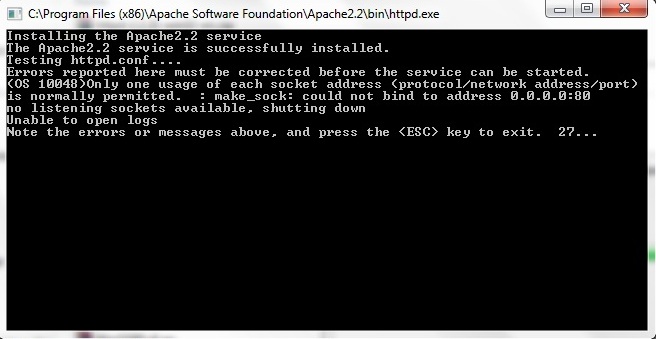
Apache Error: Could not bind to address 0.0.0.0:80 on Windows 7

If you get this error when installing apache on windows 7


1. Just continue the installation.
2. When it finish , go to the installation directory i.e "C:\Program Files (x86)\Apache Software Foundation\Apache2.2"
3. Go to the folder "conf" in the installation directory
4. Open the "httpd.conf"
5. Go to the line that has:
Listen 80
6. Add the word "localhost":
Listen localhost:80
7.Save the changes
8. Start the apache services